
Cyber Clarity
Straight answers, smart advice, and zero fluff. Because confusion is the hacker’s best friend.
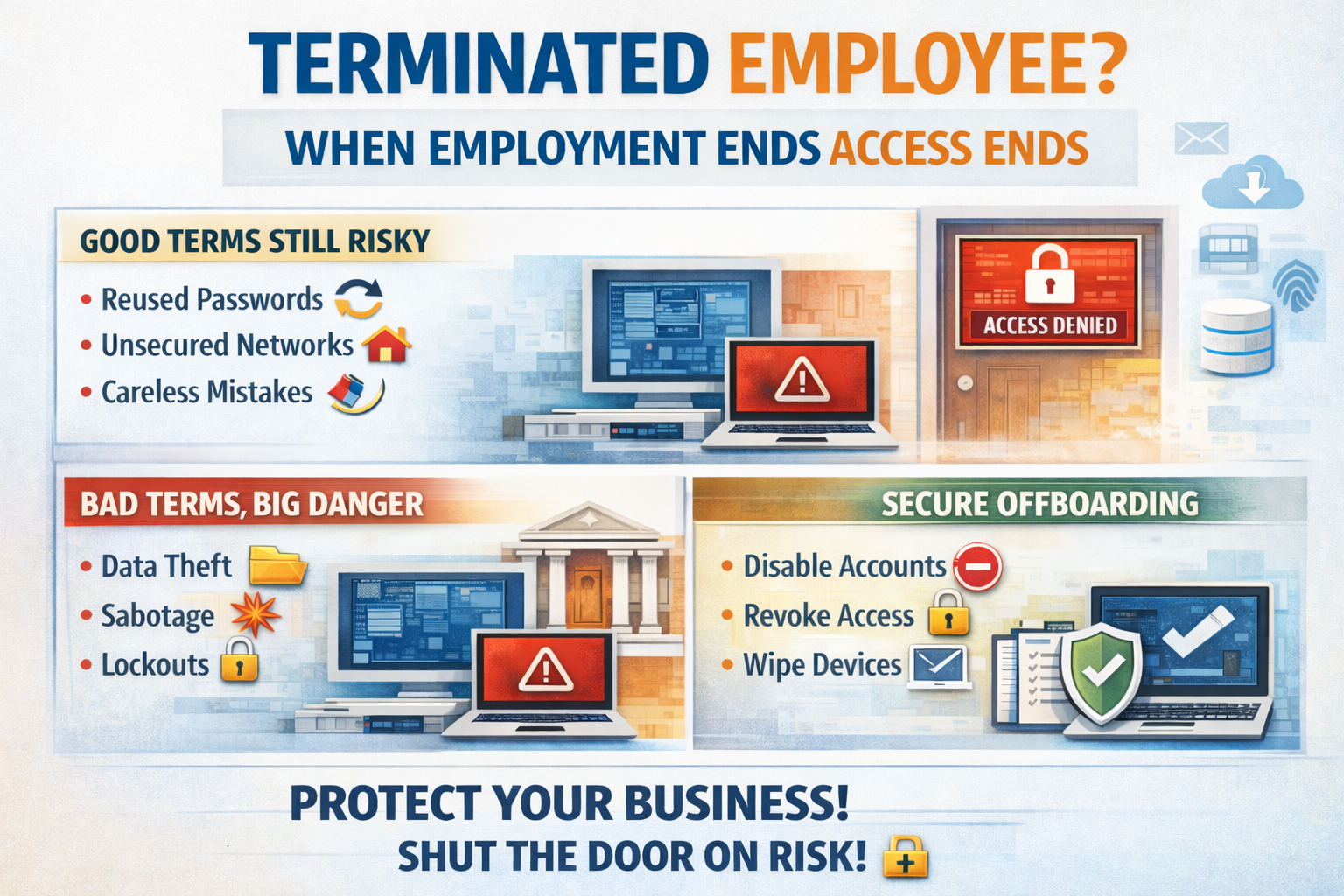
When an employee leaves your company, whether it is a handshake and well wishes 🤝 or a slammed door on the way out 🚪, one rule should always apply . Cut. Off. Access. 🔐 Immediately. ⏱️ Too many businesses treat offboarding like an afterthought. They collect the keys, maybe grab the laptop, and call it good. Meanwhile, that former employee still has email access, VPN credentials, cloud logins, saved passwords on personal devices, and maybe even administrative rights. That is not just sloppy. That is dangerous. ⚠️ Good terms do not equal good security Let’s start with the comfortable lie. “He left on good terms.” Great. That is good for morale. It has absolutely nothing to do with risk. Even the most professional, kind, and well meaning former employee is no longer bound by the same sense of responsibility once they are outside your walls. Priorities change. Emotions change. Financial pressure changes people. And sometimes it is not about intent at all. They may reuse passwords. They may store credentials in a personal password manager. They may log in from an unsecured home network. They may click on something malicious using an account that still belongs to you. Now you have exposure and they are not even on payroll. That is a problem. 🚨 Messy breakups are obvious risks If the separation was tense, emotional, or disciplinary, the risk increases exponentially. A disgruntled former employee with active access can: • Download sensitive data 📂 • Delete shared files 🗑️ • Forward confidential emails 📤 • Lock accounts 🔒 • Alter financial information 💰 • Sabotage systems 🧨 And here is the hard truth. It does not take a sophisticated hacker to cause real damage. It takes one valid login. Access is power. Remove the access. 🛑 The part most businesses forget Here is what keeps attorneys busy. ⚖️ If a former employee’s credentials are used in a breach, whether by them or by someone else who got access to those credentials, you are in trouble. Why? Because you failed to follow basic security hygiene. If their account was still active and used in a data breach, the argument against you becomes simple: You knew they were no longer employed. You knew they had access. You failed to disable it. The breach happened because of that access. That is negligence territory. And in court, that is not a fun place to stand. You will lose. ❌ It is not personal. It is policy. The best way to handle offboarding is to remove emotion from the process. Every departure should trigger a documented checklist: Disable Microsoft 365 account 🧑💻 Revoke VPN access 🌐 Remove MFA tokens 📲 Terminate remote management access 🖥️ Disable line of business application logins 📊 Collect and wipe company devices 💻 Rotate shared passwords 🔄 Remove access from third party vendors and portals 🏢 No exceptions. No delays. No waiting until the end of the week. The moment employment ends, access ends. ⛔ Compliance and insurance are watching Cyber insurance carriers expect strict offboarding procedures. Many policies now specifically require prompt revocation of user access upon termination. Regulators expect it. 🏛️ Auditors expect it. 📋 Insurance expects it. 🛡️ If you cannot prove you removed access immediately, you are exposed financially and legally. This is about protecting your business You work too hard to build your company to let a forgotten login tear it down. It is not about distrust. It is not about assuming the worst in people. It is about understanding reality. Credentials left active are open doors. 🚪 Open doors invite problems. Problems turn into breaches. 💥 Breaches turn into lawsuits. ⚖️ And lawsuits are expensive. 💸 Shut the door. 🔒 If you are not confident that your offboarding process immediately and completely removes access across every system, it is time to fix that. Because the cost of doing it right is tiny compared to the cost of explaining to a judge why you did not. Learn more about cyber liability insurance here.
🚨 TP Link Is in Legal Trouble and Your Business Should Pay Attention 🚨 Texas has officially taken action against TP Link. ⚖️ The lawsuit centers around serious cybersecurity concerns tied to networking equipment used in homes and businesses across the country. When a state like Texas steps in, it is not random. It signals risk. It signals scrutiny. And it signals that more may follow. If one state attorney general moves, others watch closely. 👀 If vulnerabilities appear systemic, regulatory pressure spreads fast. This is how it starts. 🔥 Why This Matters to Your Business Your router is not just a box with blinking lights. 💡 It is the gateway to your entire company. If your network equipment has unresolved vulnerabilities or questionable security practices behind it, everything connected to it is exposed. • Customer data 📁 • Financial systems 💳 • Email accounts 📧 • Cloud platforms ☁️ • Internal documents 📂 Cheap networking gear can become the most expensive mistake you ever make. 💸 Attackers do not look for the biggest company. They look for the easiest door. 🚪 ⚠️ If You Have TP Link Equipment This is not a wait and see moment. If you have TP Link routers, switches, or access points in your business, you need to evaluate that immediately. ✔️ Inventory every networking device ✔️ Check firmware versions ✔️ Confirm devices are still supported ✔️ Review known vulnerabilities ✔️ Create a replacement plan if necessary If you do not know how to answer those questions, that is a problem. 🚩 🧠 Your IT Provider Should Have Seen This Coming. A proactive cybersecurity partner monitors: • Vendor risk • Firmware update history • Security advisories • National security warnings • Legal and regulatory movement They do not wait for headlines. 📰 They anticipate them. If this is the first you are hearing about risk tied to your networking hardware, you need to ask some serious questions. Cybersecurity is not about reacting. It is about preventing. 🛡️ 🚪 If You Had No Idea If you have no clue what brand of router protects your business, that is not a small oversight. That is exposure. Businesses are not too small to be targeted. 🎯 In fact, they are often targeted because they are small. 💥 The Bottom Line Texas made a move. Others may follow. Your network should never be your weakest link. If you want clarity on where you stand, now is the time to find out. Because hackers love confusion. And we love shutting doors before they ever get opened. 🔐

Notepad++ has been around forever. It is lightweight trusted open source and installed on millions of systems worldwide. Developers IT admins engineers and power users rely on it daily without a second thought. That is exactly why it became a perfect target. This was not a vulnerability in the code itself. Notepad++ was not hacked in the traditional sense. Instead attackers went after something far more dangerous. Trust . What Actually Happened Attackers compromised infrastructure involved in distributing Notepad++ updates. For users running older versions of the updater the software could be silently redirected to attacker controlled servers. Those users believed they were downloading a legitimate update from a trusted source. In reality they were handed malware. The payload tied to this incident was linked to a sophisticated threat group known as Lotus Blossom. Researchers identified a custom backdoor called Chrysalis designed for stealth persistence and long term access. This was not smash and grab malware. It was engineered to live quietly inside environments. Once installed Chrysalis allowed attackers to maintain remote access exfiltrate data and blend in with normal system activity. No pop ups. No obvious signs. Just quiet control. This is what makes the incident so dangerous. Everything looked normal. Why This Attack Worked Supply chain attacks work because they abuse assumptions we all make. We assume updates are safe We assume trusted software stays trusted We assume open-source equals secure We assume attackers go after big flashy targets Every one of those assumptions is wrong. Attackers did not need to exploit Notepad++ users directly. They did not need phishing emails or malicious links. They simply waited for users to do what they are supposed to do. Update their software. Once attackers control the update path they control the endpoint. Why This Wont Be The Last Notepad++ is not special. It is representative. Every environment relies on dozens or hundreds of third party tools. Updaters agents plugins utilities browser extensions remote tools and open source software are everywhere. Many of them run with elevated permissions. Many of them auto update. Many of them assume trust instead of verifying it. Attackers know this. Supply chain attacks scale better than phishing. They bypass user awareness training. They slip past perimeter defenses. They land inside trusted workflows where security tools are less suspicious. And most organizations do not monitor software integrity closely enough to catch it early. The uncomfortable truth is this. Another trusted tool will be compromised. The only unknowns are which one and who gets hit. What This Means For Businesses If your security strategy assumes that trusted software equals safe software you already have a blind spot. Modern security requires more than antivirus and patching. It requires visibility into behavior not just signatures. It requires monitoring endpoints for abnormal activity even when the software appears legitimate. It requires assuming compromise and being ready to detect it quickly. Because the next attack will not announce itself. It will arrive quietly through something your team already trusts. Final Thought The Notepad++ incident is not about one tool. It is about a shift in how attacks happen. Attackers are not breaking down doors anymore. They are being invited inside. And unless organizations adapt their security posture this absolutely will not be the last time we see a trusted name turn into an attack vector. If you want help understanding where your environment is exposed or what trusted tools could become your weakest link now is the time to look. Not after the next incident makes headlines.

If you have tried to buy a new computer lately and felt personally attacked by the price tag, you are not imagining things. AI is hungry. And it is eating all the chips. If you haven't noticed this yet, you will. Artificial intelligence systems and data centers rely on high performance processors. The same chips that power business laptops desktops and servers are now being scooped up in massive quantities by AI companies and data centers. When demand explodes and supply stays tight, prices do exactly what you would expect. They skyrocket . Manufacturers prioritize bulk buyers. Supply chains tighten. Retail prices climb. Suddenly a basic business computer costs hundreds more than it did a year ago or even a week ago like it did for me at the time of writing this and delivers little to no improvement for everyday work. Small and mid-sized businesses feel this the hardest. You need reliable machines to run your business. You do not need to fund the AI arms race. Why New Computers Are Getting More Expensive This is not just inflation. It is a perfect storm. AI workloads require powerful CPUs GPUs and memory Chip manufacturers are focusing on high margin AI hardware Every available component is under increased demand That demand drives up costs across the entire market Even standard office computers are affected. You end up paying premium prices for hardware you do not actually need. Our Solution Smarter Hardware Without the Sticker Shock We saw this coming. So we built a smarter option for our customers. We provide lightly used and open box computers that deliver real world performance at a fraction of the cost. These are business grade systems not mystery machines pulled from a closet. Every device is carefully vetted tested and configured by our team. Here is the part most people do not expect. They come with better warranties . Yes, REALLY . Because we stand behind the hardware we deploy. Our warranties are designed for business use not consumer headaches. If something fails you are not stuck arguing with a call center or waiting weeks for a replacement. Why This Actually Makes Sense for Your Business You save money upfront You avoid inflated AI driven pricing You get enterprise quality hardware You get stronger warranty coverage You keep your business running smoothly Most businesses do not need the latest bleeding edge hardware. They need dependable systems that work every day without drama. That is exactly what we deliver. AI Can Have the Chips. You Can Have the Savings AI is not slowing down. Chip shortages and pricing pressure are not going away anytime soon. But that does not mean your business has to overpay for computers. We help our customers sidestep the chaos with smart hardware choices that protect both performance and budget. If you are tired of outrageous computer prices and want a practical alternative that actually works, let us talk. AI can fight over the chips. We will make sure your business still wins.

Cybersecurity is not a checkbox. It is not an add on. And it is definitely not something that should be bundled in with toner and copier leases. In recent years, many printer and copier companies have started offering “cybersecurity services.” On the surface, it sounds convenient. One vendor for everything. But when you look closer, there is a big difference between a company that sells cybersecurity and a company that lives it every day . Cybersecurity Is Our Core Business For a true Managed Service Provider, cybersecurity is not a side hustle. It is the foundation of what we do. We wake up every day thinking about how attackers are getting smarter, how threats are evolving, and how to keep our clients protected. Our tools, training, and processes are built around one goal: keeping your business safe and operational . Printer companies exist to sell and service hardware. Cybersecurity was added because it created a new revenue stream, not because it was their mission. That difference matters more than most people realize. Depth of Expertise Matters Cybersecurity is complex. It involves endpoint protection, email security, identity management, monitoring, backups, disaster recovery, user training, compliance, and incident response. An MSP has specialists who understand how all of these layer's work together. We test them. We monitor them. We respond when something goes wrong. Most printer companies rely on packaged solutions with minimal oversight. If something breaks or an alert triggers, it often gets escalated to a third party. That delay can be the difference between a minor issue and a major breach. We Are Proactive Not Reactive True cybersecurity is proactive. It is about preventing problems before they disrupt your business. We continuously monitor systems, apply patches, review logs, train users, and adjust security controls as threats change. We are not waiting for something to fail so we can open a support ticket. We are actively working to make sure that ticket never exists. Printer companies are built around break fix service models. That mindset does not translate well to cybersecurity. We Care Because Your Business Is Our Reputation When a client gets hit with ransomware or suffers data loss, it is personal to us. We know your business. We know your team. We know what downtime costs you. Cybersecurity is not just another line item on our invoice. It is a responsibility we take seriously. Printer companies can move on to the next lease. We build long term partnerships. Choose a Partner Not a Product Cybersecurity is not something you buy once and forget about. It is an ongoing relationship that requires trust, transparency, and expertise. When you choose a real MSP, you are choosing a partner who is invested in your success, not a company that added cybersecurity because it was profitable. If protecting your business actually matters to you, work with people who do this for a living. Because real security comes from real experts like our team at ABT Solutions.

Sync Is Not a Backup 🚫💾 Most businesses cling to OneDrive or Google Drive like they are some kind of digital life raft. It feels like a backup. It feels safe. It feels convenient. It absolutely is not. Sync tools protect productivity and convenience. They do not protect your business from disaster. What Sync Really Does 🔄 Sync mirrors whatever happens on your device without hesitation. Delete a folder - Gone everywhere. Employee accidentally drags a client directory into the recycle bin - Gone everywhere. Ransomware encrypts a mapped folder - You just synchronized the chaos into the cloud at the speed of light. I see this mistake constantly. Companies betting their survival on something that was never designed to save them when the world goes sideways. What Real Backups Look Like 🛡️ Real backups are a different animal. They live outside your production environment. They stand apart from the blast zone. They stay immutable and untouchable. They remain recoverable even if your entire network is smoking. These backups don’t care if your file server is crying or your domain controller tapped out. They exist to bring your business back from the brink. Business Continuity Starts Before the Disaster 🚨 Sync tools were built for convenience, not catastrophe. If you want resilience, you need a clean copy that sits somewhere ransomware cannot dance and employees cannot accidentally delete. Smart companies assume failure is inevitable. They plan for the moment when they need something pure, untouched, and ready to restore operations when everything else collapses. My team builds systems for those moments. Not for good days For bad days For the days you hope never come but absolutely will if your business stays alive long enough. **So Ask Yourself Do You Really Have Backups? 🤔 When someone confidently says “we have backups” PUSH BACK Do they have real resilience or just a synced folder waiting to betray them? Cybersecurity is not built on hope. It is built on preparation. Survival belongs to businesses that prepare before disaster strikes.

Artificial intelligence is everywhere, and it’s not slowing down. From writing emails to analyzing data, AI tools are helping employees work faster, smarter, and more efficiently. But here’s the catch: not everyone is using them wisely, or securely. We’re seeing a dangerous trend where employees feed sensitive company data into public AI platforms without realizing what’s at stake. When you paste internal documents, customer details, or confidential emails into a chatbot, that information can live on forever in someone else’s system. That’s a compliance nightmare waiting to happen. Even worse, some AI-generated outputs are being trusted without verification. Employees might use AI to summarize an invoice, write a contract, or draft a customer response, without realizing the tool just fabricated information or missed key details. The result? Embarrassing errors, data exposure, and potential legal trouble. Here’s what smart companies are doing right now: ✅ Creating an AI usage policy that outlines what tools are allowed, how they can be used, and what data is off-limits. ✅ Training employees on both the benefits and the risks of AI. Awareness is the first line of defense. ✅ Implementing data loss prevention (DLP) and monitoring tools to ensure sensitive information isn’t slipping through the cracks. ✅ Partnering with cybersecurity experts (that’s where we come in) to make sure security controls evolve as fast as AI does. AI can be a game-changer, but only if it’s used responsibly. Without the right guardrails, it can become your company’s biggest security gap. If you’re unsure how your employees are using AI, or if you even have visibility into it, it’s time to talk. We can help you set boundaries that keep innovation flowing and data locked down.